Overlay apps
Overlay apps are small web apps drawn on top of the game: HTML, CSS and JavaScript. They talk to the game through the rednode package and can play the game’s own UI sounds. Node mods use the same package from Node, and can open windows without writing HTML. Every app example on this page was tested in game on 2026-10-11 (Cyberpunk 2077 2.31). The Node mod examples were tested against a stand-in for the game; their in-game test (overlay phase O6a) is pending.
Status: developer preview. See the overlay design for how it works and what is planned.
How an app runs
| Part | What it does for your app |
|---|---|
| Overlay host (Electron, outside the game) | Renders your page off-screen and streams it to the game. Gives your page window.rednode |
| REDnode plugin (inside the game) | Draws your window, moves it when dragged, and sends you mouse and keyboard input |
| Bridge | Runs your game calls on the game thread and returns the answer as a promise |
In the game, F10 cycles three modes: passive (your window is drawn, the game gets input), interactive (your window gets input) and hidden. Esc, or a click on empty screen, returns input to the game.
Your first app
An app is a folder with a manifest and a page. Put it in the apps folder: packages/overlay/apps/ in the repo, or red4ext/plugins/REDnode/apps/ in the game folder.
hello/rednode-app.json:
{
  "id": "hello",
  "name": "Hello Night City",
  "version": "0.1.0",
  "author": "you",
  "description": "Shows where V is.",
  "entry": "index.html",
  "width": 360,
  "height": 200,
  "anchor": "top-left",
  "x": 100,
  "y": 100
}
hello/index.html:
<!doctype html>
<html>
<head>
<meta charset="utf-8">
<script src="rednode://ui/rednode-ui.js"></script>
<style>
  html, body { margin: 0; width: 360px; height: 200px; background: transparent; }
  rn-window { position: absolute; inset: 6px; }
</style>
</head>
<body>
  <rn-window title="Hello Night City" draggable>
    <rn-button id="where">Where am I?</rn-button>
    <p id="out"></p>
  </rn-window>
  <script>
    document.getElementById('where').addEventListener('click', async () => {
      const p = await window.rednode.call('player.position');
      document.getElementById('out').textContent = `X ${p.x.toFixed(1)}  Y ${p.y.toFixed(1)}  Z ${p.z.toFixed(1)}`;
    });
  </script>
</body>
</html>
Start the game, press F10, open the REDNODE launcher tab at the lower left and switch Hello Night City on. Load a save and click the button. All manifest fields are listed in the overlay host README.
| Rule | Why |
|---|---|
| Keep the page background transparent | Transparent pixels show the game, and clicks on them pass through to whatever is behind |
| Give the page the window’s fixed size | Pages are drawn 1:1 at 1080p and scaled with the screen height: 2x at 4K |
| Don’t draw a cursor | The plugin draws it, at the game’s frame rate |
A titled window from markup
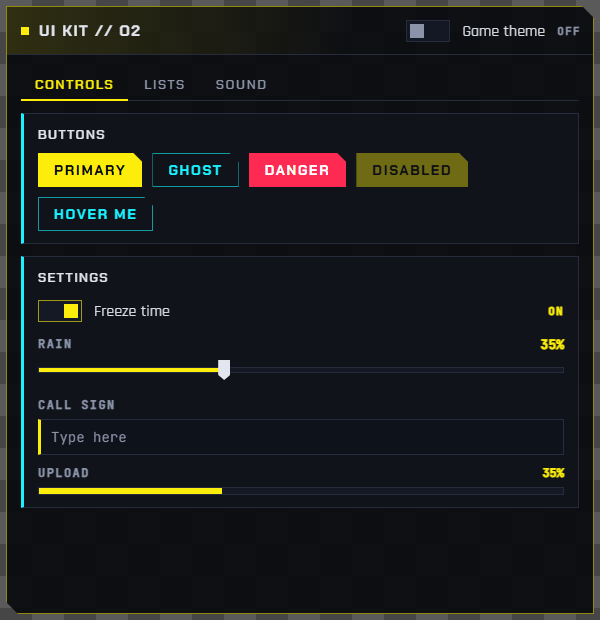
The UI kit turns markup into widgets. This is the test app apps/kit, cut down:
<rn-window id="win" title="UI kit // O2" draggable>
  <rn-toggle id="theme" slot="status" label="Game theme"></rn-toggle>
  <rn-tabs>
    <rn-tab label="Controls">
      <rn-panel title="Settings">
        <rn-toggle label="Freeze time" checked></rn-toggle>
        <rn-slider id="rain" label="Rain" min="0" max="100" value="35" unit="%"></rn-slider>
        <rn-input id="name" label="Call sign" placeholder="Type here"></rn-input>
        <rn-progress id="progress" label="Upload" value="35"></rn-progress>
      </rn-panel>
    </rn-tab>
    <rn-tab label="Lists">
      <rn-list id="list">
        <rn-item value="arasaka" selected>Arasaka <span slot="end">corp</span></rn-item>
        <rn-item value="militech">Militech <span slot="end">corp</span></rn-item>
      </rn-list>
    </rn-tab>
  </rn-tabs>
</rn-window>
The script only wires events:
document.getElementById('theme').addEventListener('change', (e) => {
  document.getElementById('win').setAttribute('theme', e.detail.checked ? 'game' : 'rednode');
});
document.getElementById('rain').addEventListener('input', (e) => {
  document.getElementById('progress').setAttribute('value', e.detail.value);
});
document.getElementById('list').addEventListener('select', (e) => {
  RednodeUI.notify(`Selected ${e.detail.value}`, { title: 'List' });
});
theme="rednode" |
theme="game" |
|---|---|
 |
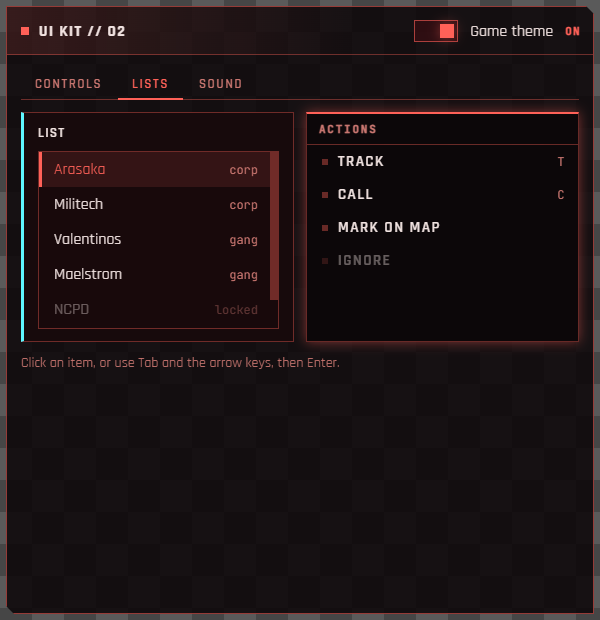 |
The grey checkerboard in these captures is the transparent part of the page. In game, the game shows there.
A native-looking button
No window frame at all: a borderless page with one game-style button and its menu. The rest of the page is transparent, so it looks like part of the game’s UI. From apps/native:
<body theme="game">
  <rn-menu id="menu" title="Stash" hidden>
    <rn-menu-item value="sell">Sell junk <span slot="end">12</span></rn-menu-item>
    <rn-menu-item value="sort">Sort by value</rn-menu-item>
    <rn-menu-item value="close">Close</rn-menu-item>
  </rn-menu>
  <div class="grip" data-rednode-drag></div>
  <rn-button id="open" sound="ui_menu_onpress">Open stash</rn-button>
</body>
const menu = document.getElementById('menu');
document.getElementById('open').addEventListener('click', () => { menu.hidden = !menu.hidden; });
menu.addEventListener('select', (e) => {
  menu.hidden = true;
  if (e.detail.value !== 'close') RednodeUI.notify(`Picked ${e.detail.value}`, { title: 'Stash', theme: 'game' });
});
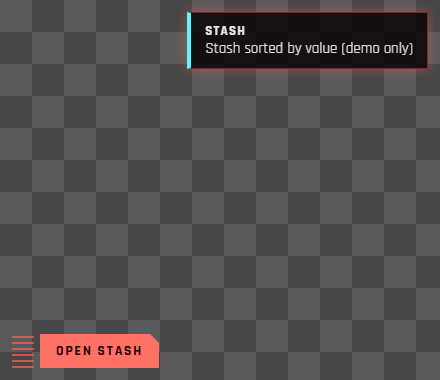
Any element with data-rednode-drag is a drag handle; here, a small striped grip. <rn-window draggable> makes its title area the handle.
A HUD widget
A HUD widget is drawn over the game but never takes input, like the game’s own HUD. Set "kind": "hud" in the manifest, and list in "hideWith" when the game should hide it. From apps/coords:
{
  "id": "coords",
  "name": "Coords HUD",
  "entry": "index.html",
  "kind": "hud",
  "hideWith": ["menu", "photo-mode", "scene", "main-menu"],
  "width": 520,
  "height": 72,
  "anchor": "top",
  "x": 0,
  "y": 14
}
hideWith value |
Hidden while |
|---|---|
menu |
A game menu is open: inventory, map, pause and so on |
photo-mode |
Photo mode is on |
scene |
A cinematic scene plays (the game’s scene tier 4 or higher; unverified) |
main-menu |
There is no player: the main menu and loading screens |
The REDnode plugin does the hiding, in the same frame the game changes state. To react in the page as well, listen for ui-state:
window.rednode.on((m) => {
  if (m.event === 'ui-state') console.log(m.menu, m.photoMode, m.scene, m.mainMenu, m.sceneTier);
});
Playing game sounds
Sounds play through the game’s own audio system, so they mix with the game and follow its volume settings. The bridge call audio.play runs the game’s native AudioSystem.Play with no entity, the way the game plays its 2D UI sounds.
Three ways, from simplest to most control:
<!-- 1. An attribute on a UI kit widget: plays on press -->
<rn-button sound="ui_menu_onpress" hover-sound="ui_menu_hover">Apply</rn-button>
// 2. The kit's helper. Never throws; silently skipped outside the game.
RednodeUI.playSound('ui_jingle_quest_success');

// Or set a default for every press in the app:
RednodeUI.sounds.press = 'ui_menu_onpress';

// 3. The bridge call itself. Resolves when the game has played it.
await window.rednode.call('audio.play', { name: 'ui_loot_take_all' });
Sound event names confirmed in game on 2026-10-11:
| Name | Use |
|---|---|
ui_menu_onpress |
Button press |
ui_menu_hover |
Hover |
ui_menu_tutorial_close |
Closing a panel |
ui_loot_take_all |
Taking items |
ui_menu_item_bought |
A purchase |
ui_jingle_quest_success |
A success jingle |
The game has many more. An unknown name plays nothing and is not an error, so the kit app’s Sound tab is the quickest way to try one. The same call from redscript is in the game API reference: AudioSystem.Play.
Talking to the game
Import the rednode package, the same one Node mods use. An import map lets the page import it by name; the host serves it at rednode://sdk/index.js. This is the Coords HUD app:
<script type="importmap">{ "imports": { "rednode": "rednode://sdk/index.js" } }</script>
<script type="module">
  import { game } from 'rednode';

  setInterval(async () => {
    try {
      const p = await game.player.position();   // { x, y, z }; fails at the main menu
      document.getElementById('x').textContent = p.x.toFixed(1);
    } catch {
      // no player yet
    }
  }, 500);
</script>
| Call | What it does |
|---|---|
game.player.position() |
V’s world position. Rejects at the main menu, where there is no player |
game.audio.play(name) |
Plays a game sound event |
game.on(name, handler) |
A game event. Today "PlayerPuppet.OnGameAttached", at the main menu and on every save load |
game.state(), game.onState(handler) |
Whether a menu, photo mode, a scene or the main menu is showing, the overlay mode, and whether the game is linked |
game.call(method, params) |
Any bridge method by name, for example "game.info" |
The full list, with examples, is in the API reference. Phase O6b adds the generic game API, generated from the game API data.
The older window.rednode calls still work, and the overlay events focus and overlay come only through it:
window.rednode.on((m) => {
  if (m.event === 'focus') console.log('focused:', m.focused); // dim your title when false
  if (m.event === 'overlay') console.log('mode:', m.mode);   // passive, interactive or hidden
});
Node mods
A Node mod is Node code that runs in the REDnode host, outside the game: full Node and npm, await anywhere, and the game never waits for it. It is a folder with a manifest that has main instead of entry:
{
  "id": "hello-mod",
  "name": "Hello mod",
  "version": "0.1.0",
  "author": "Edgemodders",
  "description": "A Node mod with a window built by the rednode ui builder.",
  "main": "mod.mjs",
  "open": true
}
A mod opens windows with the ui builder: a tree of nodes, rendered by the host with the UI kit. No HTML. This is the Hello mod, shortened:
import { game, ui } from 'rednode';

const where = ui.text('Waiting for the game...');

ui.window({
  title: 'Hello mod',
  anchor: 'right',
  x: -40,
  children: [
    ui.heading('Where is V'),
    where,
    ui.row(
      ui.button('Play sound', () => game.audio.play('ui_menu_onpress')),
      ui.toggle('Follow', (on) => console.log('Follow', on), { checked: true }),
    ),
  ],
});

setInterval(async () => {
  try {
    const p = await game.player.position();
    where.set({ text: `X ${p.x.toFixed(1)}   Y ${p.y.toFixed(1)}   Z ${p.z.toFixed(1)}` });
  } catch (err) {
    where.set({ text: err.message, tone: 'dim' });
  }
}, 500);

game.on('PlayerPuppet.OnGameAttached', () => console.log('A save was loaded'));
| Node | Makes |
|---|---|
ui.text(text, { tone }), ui.heading(text) |
Text. tone is dim, accent or danger |
ui.button(label, onClick, { variant, sound }) |
A button. variant is ghost or danger |
ui.toggle(label, onChange, { checked }) |
An on and off switch |
ui.slider(label, onChange, { min, max, step, value, unit }) |
A slider |
ui.input({ label, placeholder, value, onChange, onSubmit }) |
A text field |
ui.progress(value, { label, max }) |
A progress bar |
ui.row(...nodes), ui.column(...nodes) |
Layout |
ui.window({ title, width, height, anchor, x, y, children, onClose }) |
Opens the window. The player can drag it in interactive mode, and its position is saved |
Every node has set(props), which updates the open window at once.
| Good to know | |
|---|---|
| Output | console.log goes to red4ext/logs/rednode-mods.log, tagged with the mod id. Open the built-in Mod log app from the launcher to watch it live in game; Copy puts the lines shown on the clipboard, ready to paste into a bug report. A crash shows only the stack lines in your own code |
| Isolation | Each mod runs on its own thread in a mod process. A thrown error, an endless loop or process.exit() stops only your mod. The launcher shows it as CRASHED or NOT RESPONDING with a Restart button |
| Memory | A mod process costs about 80 MB. Players can put mods in one shared process with the launcher; three mods then took about 92 MB in total. A native crash in the shared process stops every mod in it, so a mod with native addons should set "isolation": "process" |
| Hot reload | With the launcher’s Hot reload switch on, saving a mod’s file restarts the mod, and saving an app’s file reloads its page |
.mjs |
Use the .mjs extension for import syntax, or add a package.json with "type": "module" |
More
| Where | What |
|---|---|
| UI kit reference | Every component, attribute and event, themes, keyboard keys |
| API reference | The rednode package: game, ui and every type, with examples |
| Overlay host | Running the host, the app list, the demo apps and mods |
| Overlay design | How the overlay works, test results, and the plan |